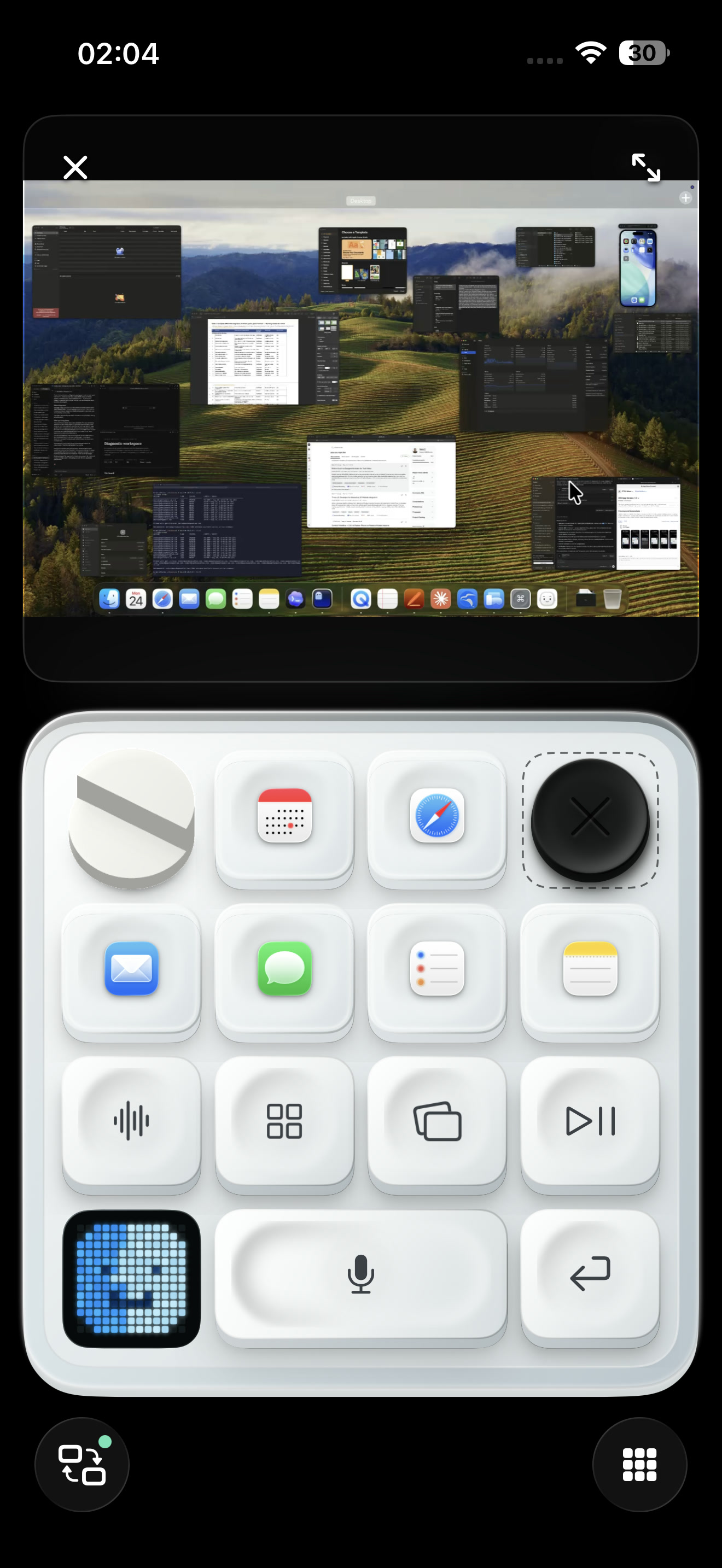
Feels like a control deck.
Apple’s Taptic Engine, sound, light, and multitouch make the deck feel physical.
Monitor and control Codex, Claude, and Cursor from your iPhone.
Open tasks, read responses, and act when your agents need you.
Apple’s Taptic Engine, sound, light, and multitouch make the deck feel physical.
Your audio stays on your Mac, with no cloud transcription or separate subscription.

Open apps, adjust volume, use Siri, and dictate from your iPhone.
Remote desktop
Open a live Desktop View, then use Trackpad, Keyboard, and your command deck without leaving CTRL Micro. Works nearby or through Remote Anywhere.
Works with
 Codex
Codex Claude
 Cursor
You can also build a custom client for your own tools.
Get CTRL Micro
Download the Mac Host and pair it with the iPhone companion. No account or payment required.
CTRL Micro Host 1.0.11 is available for Mac. The iPhone and iPad companion is available on the App Store.
Codex Micro sold out, so we recreated that tactile control experience on the iPhone you already carry.
Codex Micro is a product of OpenAI and Work Louder. CTRL Micro is an independent project, not affiliated with or endorsed by either.